How to start business automation | How to select target business and design exception handling
In business automation, we create a system from the parts of repetitive tasks where we can explain the start conditions, input, processing, and confirmation methods. Just as important as ``what to do automatically'' is the conditions for stopping when there is insufficient information. This article uses weekly sales aggregation as an example and explains how to choose your first job and try it out.
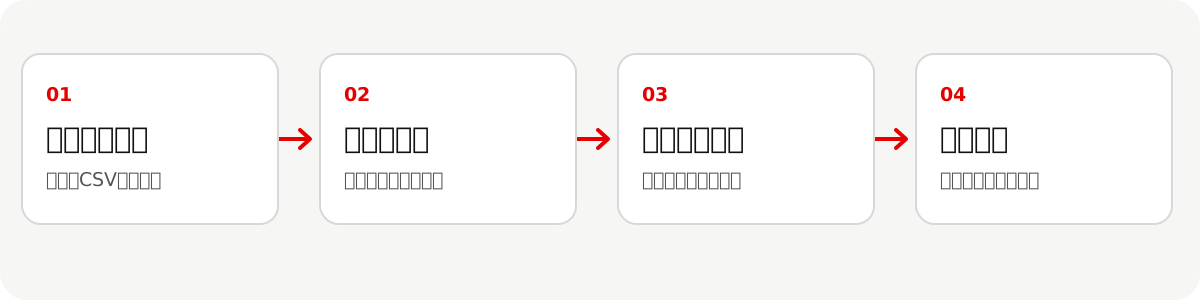
*The figure is a hypothetical weekly aggregation design example. If we detect missing or duplicate data, we will send it back to the person in charge for confirmation. *
How to choose tasks suitable for business automation
Don't just decide on candidates based on ``the number of times''; instead, check the input format, decision rules, exceptions, and the impact of errors. If the steps differ depending on the person, first organize the process using How to proceed with business improvement.
| Things to check | A state that is easy to try first | A state that you want to organize first |
|---|---|---|
| Input | Columns and items are fixed | Arrives in a different format each time |
| Judgment | Conditions can be explained in writing | Decisions are made solely based on the experience of the person in charge |
| Exceptions | Can detect and stop missing or duplicate information | Difficult to discover errors later |
| Impact | Personnel in charge can check the results and make corrections | Misprocessing can directly lead to billing and external communications |
Once you have selected an automation candidate, record some of your current manual tasks. It records not only the time from input to completion, but also the time spent checking and making corrections.
Using weekly aggregation as an example, what should you decide?
The following is a hypothetical design example for "collecting the sales CSV of each store and creating a weekly summary plan." Automate the process up to the creation of aggregation plans, and ensure that the distribution is confirmed by the person in charge.
| Design items | Entry example |
|---|---|
| Start condition | When the CSV of the target store is completed on the specified day of the week |
| Input | Store name, target date, sales amount, item ID |
| Processing | Align the target period and calculate the total for each store |
| Output | Aggregation plan, number of items, lines waiting for exclusion/confirmation |
| Stopping conditions | Missing required columns, duplicate item IDs, mismatched target periods |
| Person in charge of confirmation | Person in charge of checking original data and tabulation plan |
| Recovery | Rerun with the corrected original data and leave a history that overwrites the previous draft |
Merely being able to execute the test will not pass the exam. In addition to normal input, try cases where one CSV is not received, the column name changes, or the same details are entered twice, and check to see if incorrect aggregation is confirmed. When considering the scope of automation using daily and weekly reports as an example, you can also refer to Procedure for creating weekly reports from daily reports.
Download the automation design sheet (CSV) and fill in everything from starting conditions to recovery methods with your own work. The example rows are fictitious.
Three design examples to automate routine tasks
Even for the same "routine work," the scope of responsibility will vary depending on the input format and the impact of errors. The following is not a track record, but a hypothetical design example that you can consider by replacing it with your own work.
| Business | Start conditions and input | Scope of automation | Confirmation of stopping conditions and people |
|---|---|---|---|
| Weekly sales aggregation | Store CSV is complete | Align the period and create a summary plan | Stop due to missing or duplicate data, and the person in charge checks it with the original data |
| From daily reports to weekly reports | Daily reports for the target week are complete | Summary of implemented items and unfinished items | Conflicting dates or unclear personnel should be deferred and confirmed by the person in question |
| Posting an invoice | Receiving an invoice | Extracting necessary items into a posting table | Accounting staff checks the amount, account, and tax classification against the original. Payments do not run automatically |
In all three cases, not only the working time but also the confirmation/correction time and the number of exceptions are recorded. Even if you can extract tasks such as invoices, where mistakes can have a big impact, avoid automating everything from approval to payment all at once. Details of daily reports can be found in Procedure for creating weekly reports from daily reports.
How to automate?
Once input and processing have been decided, first check whether the existing spreadsheet functions and business system settings are sufficient. RPA is a candidate for repeating screen operations, and workflow coordination is a candidate for passing between multiple tools. If you have a process of reading, classifying, and summarizing documents, consider Automation design using AI. Rather than choosing by product name, compare by the required process and authority.
How will we measure the impact and when will we expand it?
Compare "traditional work time" and "time including execution confirmation and correction after automation" for the same type of project. The estimated time saved is the difference per case multiplied by the number of cases. However, setup, maintenance, and exception handling time and usage fees are recorded separately. Once the person in charge can confirm the results and try stopping and restoring the system, they will decide whether to expand the scope.
When proceeding to training/Grokbot
If the president himself wants to try automation in his company's business and decide which processes to delegate, please see Contents and preparation of AI training for presidents. If you want to entrust work that uses multiple materials and tools to Grokbot, you can check the scope of collaboration, approval, and operation in Confirmation items required for Grokbot introduction after training and Grok Bot company introduction procedure.
When consulting, it will be easier to decide on the range to try if you organize the input examples of the target business, the current procedure, and the operations you want to stop in case of failure.